NordVPN’s been sitting at the top of basically every “best VPN” list for years, which does look kinda sus. Earned title, or just SEO inertia keeping it there? So instead of trusting another listicle, I said fudge it, I’m downloading it myself to find out.
Short answer: mostly earned. Long answer below.
What NordVPN Actually Gets Right
Speed
This is the one category where Nord does well. Their WireGuard-based protocol (NordLynx) adds barely any latency on top of your normal connection. That means you can get on a call with your friend without missing out on bits of the juicy gossip. I won’t lie, sometimes some of their servers can be down.
I ran my own Fast.com tests across a handful of server locations instead of just trusting the marketing numbers, and the results were a mixed bag, honestly:
| Server route | Speed | Latency (unloaded/loaded) | Upload |
|---|---|---|---|
| AU (Malaga/Melbourne/Sydney) | 41 Mbps | 278ms / 315ms | 19 Mbps |
| US (Ashburn/Secaucus) | 67 Mbps | 246ms / 326ms | 21 Mbps |
| UK (London/Slough) | 61 Mbps | 30ms / 109ms | 23 Mbps |
| CA (Toronto) | failed | failed | failed |
| JP/HK (Tokyo/Tsuen Wan) | 48 Mbps | 268ms / 333ms | 14 Mbps |
| HK/SG (Tsuen Wan/Singapore) | 50 Mbps | 350ms / 396ms | 390 Kbps |
That Toronto route flat out failed: “Could not reach our servers to perform the test.” Didn’t cherry pick that out either, because if I’m telling you to trust my numbers, not Joshy who thinks all VPN are the same, you deserve to see when it actually flopped too.
The UK route was clearly the best of the bunch (30ms unloaded latency is genuinely great), while the longer hauls into Asia dragged a bit more. Makes sense though: the farther the server, the higher the latency.
Security fundamentals
AES-256 encryption, a kill switch that actually works when your connection drops mid download or whatever. I care about this specifically because a lot of VPNs claim a kill switch and then leak your IP for half a second anyway. You really don’t want to get a letter in your mail for downloading Shrek 3. Also, the no log policy that’s been through five rounds of independent auditing. They don’t just tell people, ooh hey, “we say we don’t log, but…” but third parties checking that claim repeatedly. That matters more to me than most of their features.
They’re also based in Panama, which may give them the upper hand to not give your data the way providers in the US or UK may be compelled to.
Streaming access
Netflix (different regional libraries), Disney+, BBC iPlayer, Max, Peacock…etc. It gets through all of them without the constant cat and mouse some VPNs deal with against Netflix’s VPN detection. If unblocking content is your main use case, this is a genuine win.
Where It’s a Little Annoying
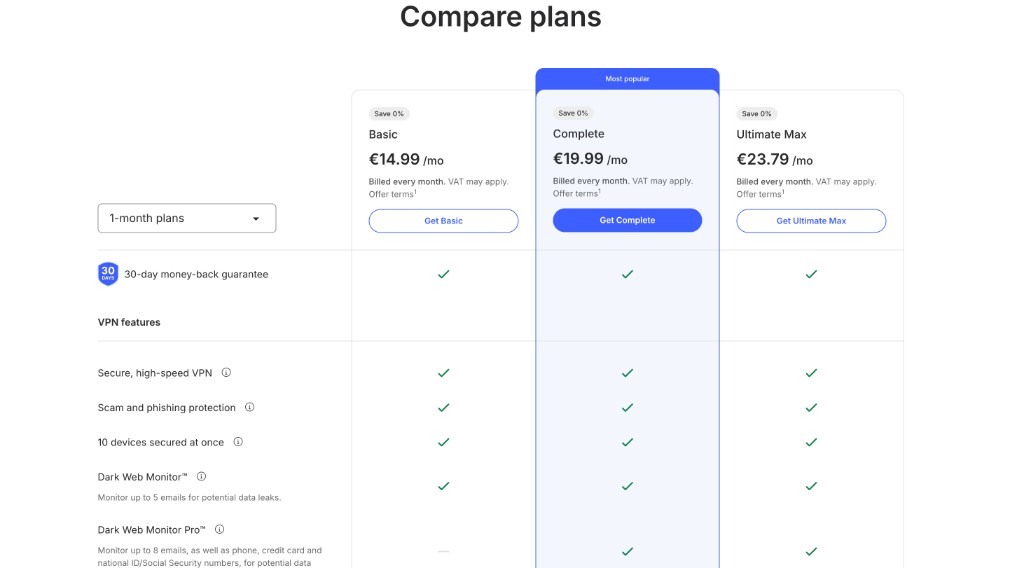
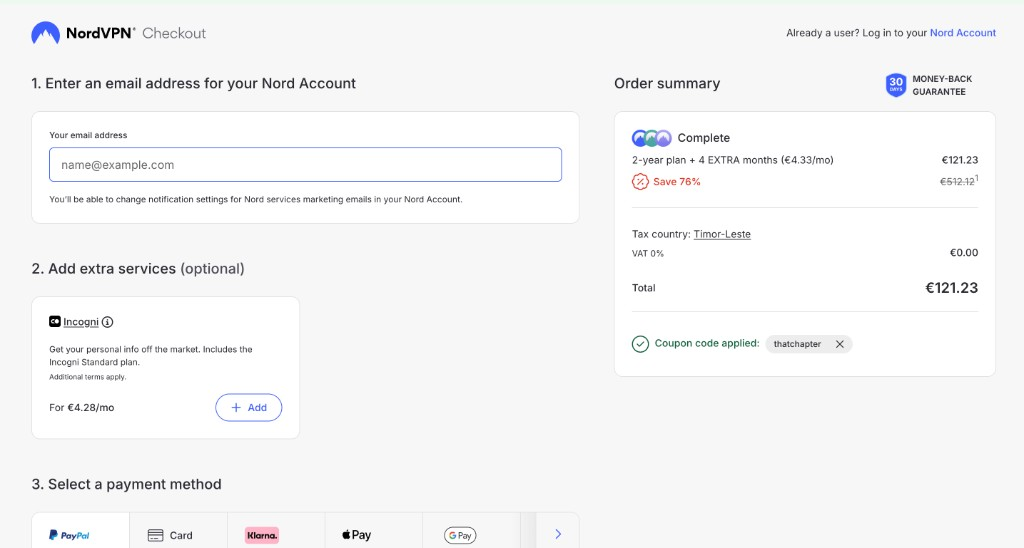
The pricing structure plays the usual VPN games. The monthly price is intentionally bad, don’t even look at it. The pricing that actually makes Nord worth considering only shows up if you commit to a 2-year plan, which drops it down to a few dollars a month. This isn’t unique to Nord, every major VPN does this now, but it’s still a little annoyingggg when you’re comparing options and the “real” price is buried three clicks deep. Like bruh, really now??
There are four tiers (Basic, Plus, Complete, and a US-only Prime tier), and honestly, unless you specifically want a bundled password manager or encrypted cloud storage, the Basic plan covers what most people actually use a VPN for.
Torrenting means only using their P2P-optimized servers because not every server supports it, and there’s no port forwarding either. Once you’re on the right server, though, speeds and encryption hold up fine.
The Security Headline You Might Have Seen
If you’ve seen tweets about a NordVPN leak, which happened in January 2026 was more of a scare tied to a Salesforce environment. Which turned out to be a third-party test environment, not Nord’s live systems. Worth knowing since it’s probably one of the first things you’ll see if you Google them right now.
App Experience Across Devices
Most VPN apps look the same these days, server map, quick-connect button, settings under a cog icon. Nord’s is intuitive and doesn’t need a learning curve.
Worth flagging: Android gets split tunneling and a call-blocking feature (limited countries) that iOS doesn’t have. Nothing dealbreaker-level, just not full feature-parity. Windows has a couple more protocol options than macOS, but NordLynx, basically the fast protocol connection, works on both.
Extra Features Worth Knowing About
- Threat Protection Pro, blocks malware and malicious sites, doubles as an ad/tracker blocker
- Dark Web Monitor, flags if your info shows up in a breach
- Meshnet, direct device-to-device file sharing, niche but handy
- Split tunneling, choose which apps use the VPN (Android/Windows only)
None of these are why you’d buy a VPN, but they’re solid value-adds on the higher tiers.
So, Is It Worth It?
If you want fast connections, an audited no-logs policy, and reliable streaming access, why not? Nord earns a gold sticker, however, it ain’t the cheapest, and the pricing page nudges you toward a longer commitment than you might want, but the product underneath holds up well.
If torrenting with port forwarding is a dealbreaker, or you specifically need an iPhone free trial before paying, other providers handle those two things better. For everything else, privacy, streaming, day-to-day security, it’s not a bad deal at all!